Parsing SCPI commands is a rather involved task. Here I am showing how to perform two central steps: setting up a command table in a human readable form and performing the lexical analysis on command headers.
Parsing SCPI Commands
Parsing a SCPI command can be broken down into several tasks. Consider as an example the command string CHANnel4:FREQuency 2MHZ;POWer?.
If the command string contains several commands separated by semicolons: split the line into individual commands. Here: CHANnel4:FREQuency 2MHZ and POWer?
Split a command into the command header and the command arguments. E.g. CHANnel4:FREQuency and 2MHZ.
Perform a lexical analysis on the command header.
Perform syntactic and semantic analysis on the arguments.
Call action functions to set parameters or retrieve a response.
In this discussion I am focusing on step 3, the lexical analysis of a command header.
The lexical analyzer I am going to show here is able to
Accept long and short forms of a keyword. E.g. FREQ and frequency for keyword FREQuency
Accept optional keywords. E.g. SYST:ERR and SYST:ERR:NEXT for command SYSTem:ERRor[:NEXT]
Return a list of numeric suffixes. E.G. CHAN3:PORT4:POW 1 → suffixlist = [3,4]
Parse Trees
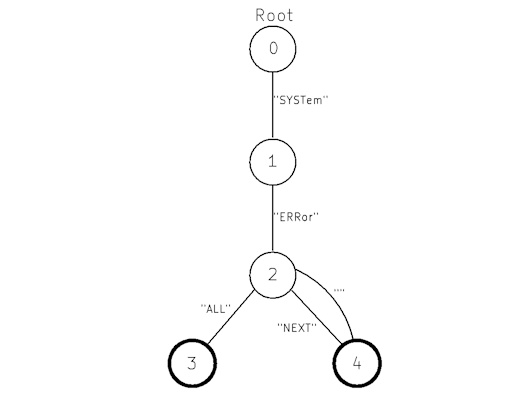
A set of commands can be depicted as a parse tree with one root node. Every node in the tree is connected to each of its children nodes by a branch which is annotated by a keyword. To parse a command header we traverse the tree from top to bottom by matching the current keyword in a compound command header with a branch fanning out from the current node we are on.
Example:
Consider the command SYST:ERR:NEXT for the parse tree depicted above. The keywords of this command are SYST, ERR and NEXT.
Current node is the root node. The only branch from this node is SYSTem which matches our first keyword → go to node 1
Current node is 1. The only branch from this node is ERRor which matches our second keyword → go to node 2
Current node is 2. Here we have two branches. Branch NEXT matches our third keyword → go to terminal node 4
As we are on a terminal node and we have used all our keywords, the parse is complete and successful.
Note: Command SYST:ERR would also have worked here because there is a parallel branch with an empty keyword going from node 2 to node 4. This means that keyword NEXT is optional.
Modelling the Parse Tree
We are modelling the nodes and branches in software with the two classes Node and Transition.
Node is essentially a collection of branches called Transition here. If its member m_cmd is defined it is also a terminal node. Member m_epsilon defines an optional branch.
class Node
{
public:
…
private:
Epsilon m_epsilon;
std::vector<Transition> m_Transitions;
const class Command* m_cmd = nullptr;
};
Struct Transition encapsulates the transition keyword and the child node to transition to.
struct Transition
{
std::string m_txt;
class Node* m_Child = nullptr;
…
};
Command and Commands
Struct Command establishes the relationship between a command header and a unique command id which can be used for further processing after the command has been recognized by the lexical analysis.
struct Command
{
Command(const char* hdr, int32_t cmdId)
:m_Hdr(hdr)
,m_cmdId(cmdId)
{}
Finally, class Commands holds a list of commands and the root node. By adding commands with function add() the parse tree grows by adding new nodes starting from the root node.
Function lookup() parses a command string and returns a list of numeric suffixes and a flag signalling, if the command was a query.
class Commands
{
public:
Commands()
:m_Root()
{}
const Command* lookup(std::string line, std::vector<uint32_t>&suffices, bool& query);
Error::errnumber add(const Command* cmd);
private:
Error::errnumber makeEntry(const std::string &s, const Command* cmd);
Node m_Root;
std::vector<const Command*> m_Commands;
};
An Example
This is an example of how to instantiate the command table and how to parse command headers.
tcmdId defines the command IDs of the commands we want to define.
The command table is built by successively adding new Command structs to Commands commands. Sqare brackets in the command headers denote optional nodes and numeric suffixes are in angle brackets.
Collection headerlist contains several example command headers. The for loop iterates over the list and prints the result of the parsing process. Instead of just printing the command ID an actual program could, depending on the ID, analyze the arguments and call setter/getter functions.
enum tCmdId{eNone, eIdn, eSystErrAll, eSystErr, eChanFreq};
int main(int argc, char **argv)
{
Commands commands;
static const Command list[]{
{“*IDN”, eIdn},
{“SYSTem:ERRor:ALL”, eSystErrAll},
{“SYSTem:ERRor[:NEXT]”, eSystErr},
{“CHANnel<ch>:FREQuency”, eChanFreq}
};
for (const auto& l : list)
commands.add(&l);
std::vector<std::string> headerlist{
“*IDN?”,
“SYST:ERR:ALL?”,
“SYSTem:ERRor?”,
“SYST:ERRor:NEXT?”,
“CHANnel3:FREQuency”,
“CHANnel4:FREQuency?”,
“SYSTem”,
“Foo”
};
for (std::string hdr :headerlist)
{
std::vector<uint32_t> sufflist;
bool query;
const Command* pCmd = commands.lookup(hdr, sufflist, query);
std::string suffix = sufflist.empty() ? “-” : std::to_string(sufflist[0]);
const char* strquery = query ? “Y” : “N”;
if (pCmd)
printf(“found ID %d for header <%20s>, query = %s, suffix = %s\n”, pCmd->m_cmdId, hdr.c_str(), strquery, suffix.c_str());
else
printf(“header <%s> not found\n”, hdr.c_str());
}
}
Code using this approach is easy to read and maintain. As the command table is generated at runtime no additional tooling is required. On the downside, building the command table takes some time, which may slow down the startup. Also, if RAM is scarce this method may cause issues.
The complete code can be found in the Download section
Improvements
The code can be improved in several ways
There is a 1:1 relationship between nodes and transitions. We can therefore integrate the transition into the node the transition is pointing to.
There is no need for us to store the commands in collection Commands::m_Commands. Having the commands ready makes it easier to implement function SYSTem:HELP:HEADers but with a little effort we can also get the list of commands by iterating over the parse tree.
The Node objects are allocated somewhere on the heap and pointed to by pointer variables. If we instead keep them in an array we can reference them by indices which can be bytes or shorts. This reduces the memory footprint and makes life easier should we in the future decide to put the parse tree into ROM.
This the new Node class:
#define NODEINDEXTYPE uint8_t // increase size if required
class Node
{
public:
NODEINDEXTYPE findexact(const std::string &s) const;
NODEINDEXTYPE find(const std::string &s, int32_t &suffix) const;
NODEINDEXTYPE addChild(const std::string& keyword, size_t suffixposition, bool isOptional);
static Node* get(NODEINDEXTYPE idx){return &m_Nodes[idx];}
…
private:
std::string m_keyword;
size_t m_suffixposition;
bool m_isOptional;
std::vector<NODEINDEXTYPE> m_Children;
const class Command* m_cmd = nullptr;
static std::vector<Node> m_Nodes;
};
The Node objects are now kept in static member m_Nodes and what used to be a list of transitions is now m_Children, a list of index variables which reference the child nodes.
The former epsilon transitions have been replaced by the attribute m_isOptional;
Class Commands now has no more members. The root node now is the first element in the nodes collection and m_Commands has ben removed.
The new function systHelpHeaders lists all commands by recursively traversing the parse tree and collecting the Command pointers of the nodes without children.
static void collectCommands(NODEINDEXTYPE nodeidx, std::vector<const Command*>& list)
{
Node* pNode = Node::get(nodeidx);
std::vector<NODEINDEXTYPE> children = pNode->getChildren();
if (children.empty())
{
list.emplace_back(pNode->getCmd());
}
else
{
for (NODEINDEXTYPE idx : children)
collectCommands(idx, list);
}
}
std::vector<std::string> Commands::systHelpHeaders()
{
std::vector<const Command*> cmdlist;
std::vector<std::string> list;
collectCommands(0, cmdlist);
for (const Command* c: cmdlist)
{
printf(“%s\n”, c->m_Hdr);
list.emplace_back(c->m_Hdr);
}
return list;
}
The complete code of the improved version can be found in the Download section.